What the Game Porting Toolkit is
The Game Porting Toolkit (GPTK) is Apple's kit for developers who want to bring Windows games to the Mac. It lets them try how their Windows game runs on Apple silicon before they port it. It contains:
- D3DMetal, which translates a game's Direct3D 11 and 12 graphics to Metal;
- an evaluation environment, built on Wine, for running the Windows version of a game;
- tools that help developers convert their shaders and code for Metal.
You download it from Apple's developer website with your Apple Account. Setting up its evaluation environment yourself means working through developer instructions in Terminal. That's fine for developers, and hard work if you just want to play.
What D3DMetal does
Windows games draw with DirectX; a Mac draws with Metal. D3DMetal translates between the two in one step, for 64-bit games using DirectX 11 or 12. That makes it the way to run DirectX 12 games on a Mac.
D3DMetal is Apple's and isn't open source. Apple licenses it for non-commercial use in developing, testing and evaluating games on Apple hardware. Portnaut is free and non-commercial, and downloads Apple's files unchanged (what Portnaut downloads, and from whom).
Use D3DMetal with Portnaut
- Download Portnaut, open it, and choose Prepare Portnaut. It downloads Wine and the renderers once, D3DMetal included. That needs an Apple silicon Mac with macOS 14.6 or later and Rosetta.
- Create a bottle with Bottles › New Bottle…. New Steam and EA app bottles start on D3DMetal, because most of their games use DirectX 11 or 12.
- Install your launcher and a game in the bottle, as you would on a PC.
- Check the renderer. In the bottle's Graphics section, Portnaut shows the renderer it recommends for each game. It picks D3DMetal for 64-bit DirectX 12 games. You can switch between D3DMetal, DXMT, DXVK and Wine's own at any time.
- Play from Portnaut's library.
For DirectX 11 games, DXMT is often the better first choice, and D3DMetal the one to try if a game misbehaves. Portnaut records the frame rate of every session, so you can compare the two. How the renderers compare.
Game Porting Toolkit with Steam
Most people want D3DMetal for their Steam library. In Portnaut a Steam bottle starts on D3DMetal, so the only steps are installing Steam, signing in and installing a game. How to play Steam games on a Mac walks through it.
Keeping D3DMetal up to date
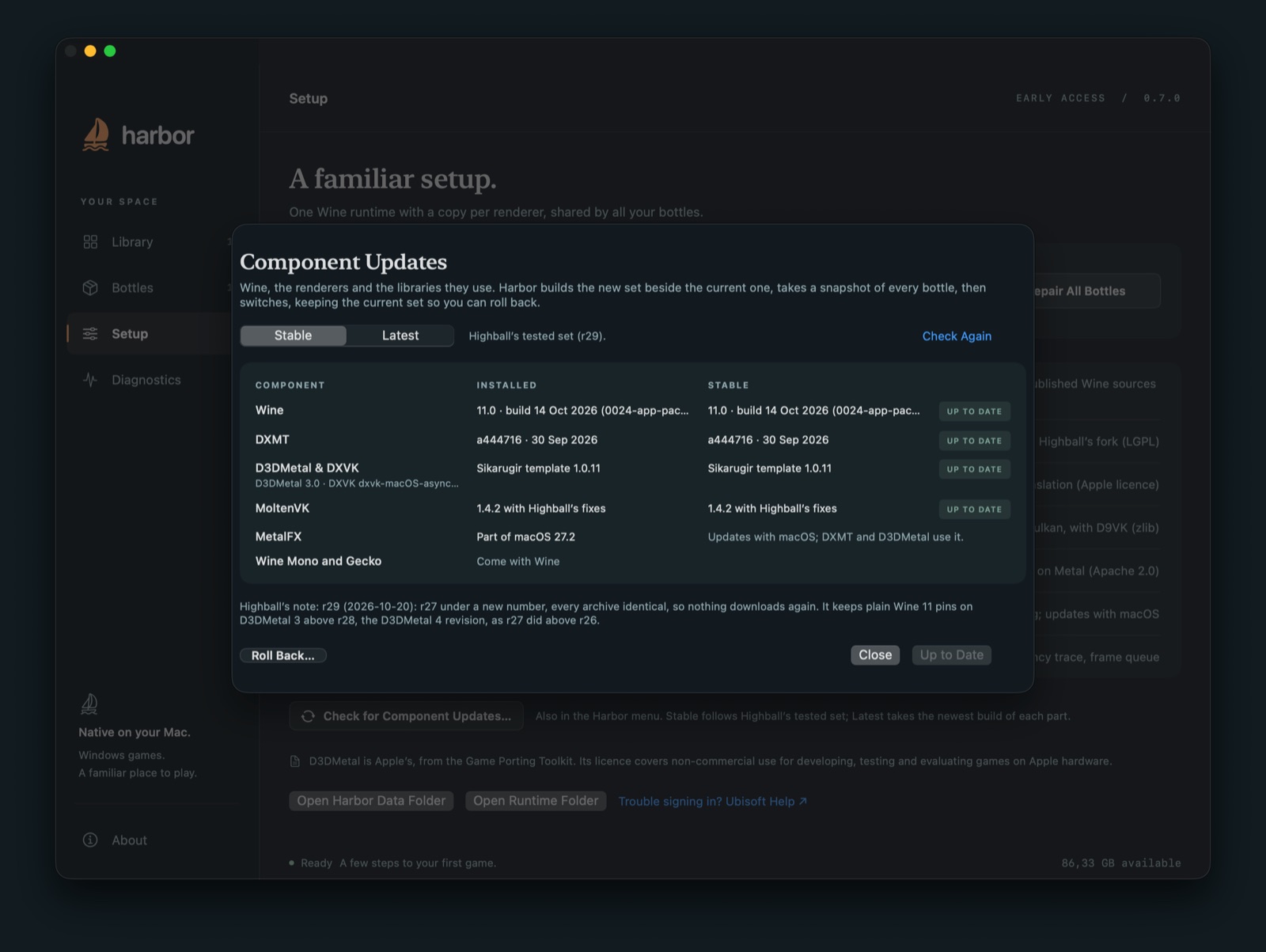
Apple updates D3DMetal from time to time. Portnaut's Component Updates offers two channels:
- Stable: a tested set of Wine and the renderers. It currently includes D3DMetal 3.0.
- Latest: the newest published builds, whose D3DMetal may be a beta.
Portnaut takes a snapshot of your bottles before it switches, so you can roll back if a game stops working.
What D3DMetal can't do
- 32-bit games: D3DMetal covers 64-bit games only. In a D3DMetal bottle, 32-bit programs use Wine's own Direct3D. For 32-bit DirectX 10 and 11 games, DXVK is the fast option.
- Anti-cheat: games with kernel-level anti-cheat don't run under Wine, whatever the renderer.
- DLSS: Portnaut can pass a game's DLSS through to Apple's MetalFX on D3DMetal. This is new, and so far tested with Steam's interface, not a game.
Questions
Do I need to download the Game Porting Toolkit myself?
No. Portnaut downloads D3DMetal for you when you prepare it, and keeps it up to date through Component Updates. You don't need a developer account or Terminal.
Is the Game Porting Toolkit free?
Apple offers it to developers at no charge, under a licence for non-commercial use in developing, testing and evaluating games. Portnaut is free too.
Can a Mac run DirectX 12 games?
That's what Apple built D3DMetal for, and Portnaut picks it for 64-bit DirectX 12 games automatically. How well a particular game runs depends on the game. Portnaut hasn't tested a DirectX 12 game in depth yet, and games with kernel-level anti-cheat don't run.
Is D3DMetal better than DXMT?
For DirectX 12 games, D3DMetal is the only fast option. For DirectX 11 games, DXMT is usually the first choice and D3DMetal the alternative. The full comparison.
Next: Steam on Mac · DXMT vs D3DMetal vs DXVK · Windows emulator for Mac?